AI outfit changer: change the clothes in a photo
The short answer: an AI outfit changer replaces the clothing in a photo while keeping the person wearing it. In practice the good results come from changing the outfit and its context together — a gown in your living room reads as a costume, a gown on a red carpet reads as a photograph. Pose AI's Reimagine mode does exactly that: it keeps your face and rebuilds the outfit, the setting and the lighting as one coherent scene.
Why outfit changes look fake on their own
Clothing carries context. A tuxedo implies a room, a light source, a reason. When a tool swaps only the garment and leaves the background alone, three things give it away instantly:
- The light doesn't match. Your original photo has a direction and colour of light baked into your face and hair. A pasted-in outfit lit differently reads as a cut-out, even if the edges are perfect.
- The setting contradicts the clothes. Evening wear against a kitchen cupboard. Ski gear in front of a bookshelf. The brain flags the mismatch before it notices the seams.
- The posture is wrong for the outfit. People sit differently in a suit than in a hoodie. A slouched pose in tailored clothing looks borrowed.
Which is why the more useful framing isn't "change my clothes" — it's "put me somewhere that explains these clothes."
What a scene-level outfit change actually does
Reimagine keeps your face and treats everything else as replaceable. Pick Red Carpet and you get the dress, the step-and-repeat, the flash, and the light on your face that flash would produce. Pick Ski Lodge and you get the knitwear, the fire, and the warm bounce that fire throws.
The outfit is one output of the look, not the whole of it. That's what makes it hold together.
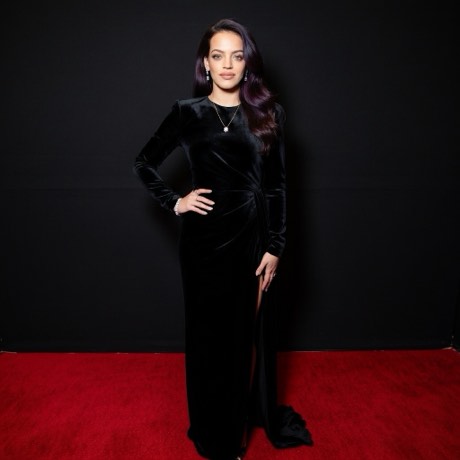
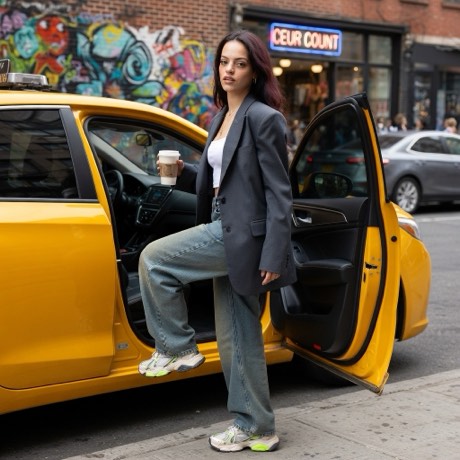
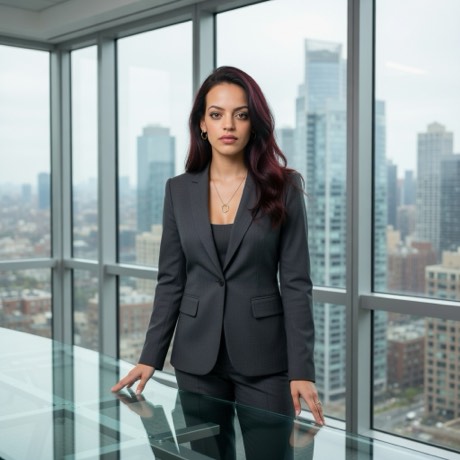
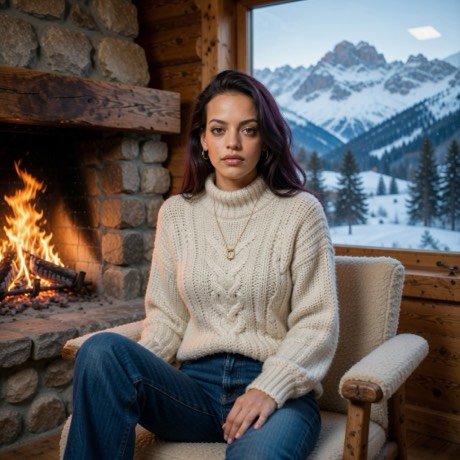
How to change the outfit in a photo
- Download the app — Pose AI, free on the App Store.
- Take the photo, or bring one in. Shoot straight from the app's camera, or pull in something already on your camera roll. Nothing leaves your phone until you pick a look.
- Open the Looks family. These are the wardrobe-led styles — Red Carpet, Street Style, Boardroom, Club Night, Disco, Western, Tattooed, Gym Rat, Stage, Backstage, Rider, Orbit, The Wedding and Glow Up.
- Make sure you're on Reimagine. Restyle deliberately preserves your clothing — it's the wrong mode for this job. Reimagine is the one that replaces it.
- Give it about twenty seconds, then save or share.
Getting a usable result
- Give it room. A tight head-and-shoulders crop has almost no garment in frame to change. A half-body or full-body shot has something to work with.
- Simple starting clothes help. A plain top is easier to replace convincingly than a busy print with its own strong silhouette.
- Match the energy. A seated, relaxed pose suits Backstage or Morning Café. A standing, front-on pose suits Red Carpet or Boardroom.
- Try two. Wardrobe styles vary more between runs than lighting styles do, because far more of the image is being invented.
Where it falls down
Be realistic about this one, because outfit changes ask the most of the model. Hands near clothing — in pockets, holding a lapel — are where errors concentrate. Logos and text on garments come out as approximate lettering. Complex tailoring like a double-breasted jacket sometimes gains or loses a button row. Jewellery moves. And if you need the exact garment you own, reproduced accurately, no generative tool does that — it's inventing plausible clothing, not photographing yours.
What this isn't
This is not a virtual try-on for shopping. It won't show you how a specific product looks on your body, and it shouldn't be used to decide a purchase. It's for making a photograph of yourself somewhere more interesting than where you were.
Change the outfit, change the night
Fourteen wardrobe-led looks, all keeping your face.
Download on theApp StoreFree to download · iPhone · iOS 17+