Why the same photo never comes back the same twice
The short version: a filter calculates its output, so the same photo always gives the same result. A generated image is sampled: the model makes random choices on the way to a picture, so the same photo and the same look come back different every run. Looks that are asked to keep more of your photo, like a lighting change, vary less. Looks that rebuild the whole scene vary more. Running a look again is a good way to fix a one-off mistake. It won't fix a problem with the photo itself.
People notice this the first time they run the same look twice. Same photo, same look, and the second picture has a different jacket, a different window, a slightly different tilt of the head. The natural reading is that something is inconsistent or broken.
It isn't broken. It's the most important difference between the tool you're using now and every photo filter you used before it, and once you understand it you'll use the tool better.
A filter is a function. This isn't.
A classic filter is arithmetic. Lift these shadows, warm these mids, add this grain. Put the same photo in and you get the identical photo out, pixel for pixel, forever. That predictability is also its ceiling: a filter can recolour the room you're in, but it can't move you out of it.
A generative model doesn't calculate the answer. It builds one. Some models refine an image out of noise and some predict it piece by piece, but somewhere along the way every one of them makes choices that start from randomness. Your photo and the description of the look steer those choices hard. They don't make them for the model.
Why there's more than one right answer
Take a request like “this person, on a night train.” There are thousands of pictures that satisfy it. Window on the left or the right. Sleeper car or commuter carriage. Coat on or off. Looking out at the dark or back at the lens. Nothing in your photo settles those questions, so the model has to answer them, and it answers them differently each time.
Most systems let you pin that randomness to a fixed starting number, called a seed, so that one run can be repeated exactly. Pose AI doesn't fix one. Every run starts fresh, and that's deliberate. A fixed seed gets you the same picture twice, not a better one. If the first interpretation missed, a fixed seed just locks the miss in.
What the look pins down, and what it leaves open
How much two runs differ depends mostly on how much the look is allowed to change.
Restyle tells the model to keep the same camera angle, framing and composition, and only change the light, the colour and the era. That leaves very few open questions. Two runs of Golden Hour on the same photo will read as the same moment with small differences in how the light falls.
Reimagine is the opposite. It tells the model to throw away the original room entirely, change the pose, the clothing and the setting, and keep only your face. That leaves almost everything open, so two runs can look like two different photoshoots. Left to itself, a model asked to put you somewhere else tends to take the safe route and give you the same room in new colours, which is why Reimagine's instructions say out loud that the old location has to go. More on choosing between the two in how to restyle a photo with AI.
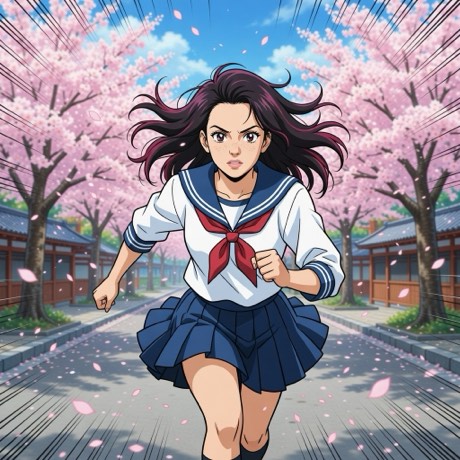
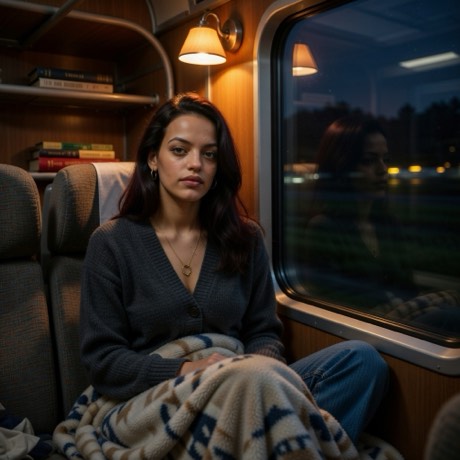
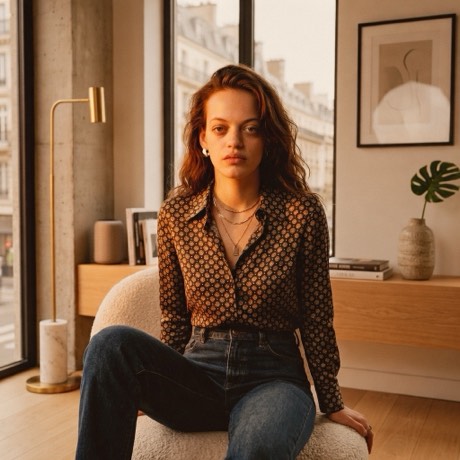
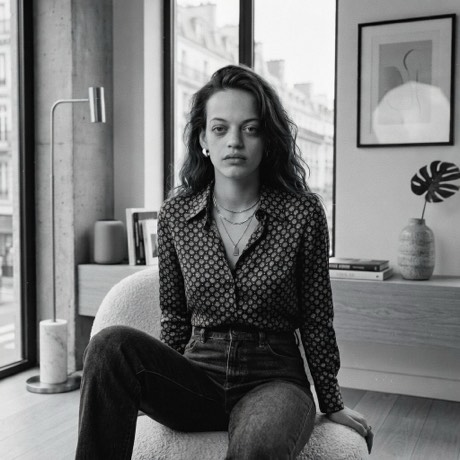
All four started as the same photograph. The first two rebuilt the scene, the second two kept it, and that's the same split that decides how much a second run will differ from the first.
Variation is the useful part
Photographers have always worked this way. You don't take one frame of a portrait. You shoot a roll, lay out the contact sheet, and circle the one where the expression landed. The picture people see was chosen, not simply taken.
Generated imagery puts that choosing step back into a phone photo. A second run isn't a do-over for a mistake. It's another frame on the sheet. That also explains why a whole photoshoot can come from a single photo: one input, many samples, and you keep the ones that work.
When running it again helps, and when it doesn't
Running it again fixes things that went wrong by chance:
- A hand that came out with the wrong number of fingers.
- A composition that crops you awkwardly or puts something odd behind your head.
- A scene that technically fits the look but just isn't a good picture.
- A likeness that drifted a little. The next sample may hold your face more closely.
Running it again won't fix things that go wrong because of the photo: a face in shadow, a full side profile, a crowded group shot, a crop too tight to leave room for a new scene. Those problems come back every run, because every run starts from the same input. They're covered in the photos none of these looks will save.
The rule of thumb: if two runs fail in the same way, stop running it and change the photo. Turn toward the window, lower your hands, step back from the bookshelf.
How to pick between runs
Judge in this order. First, the face, looked at small, the size it'll actually be seen at in a feed or as a profile picture. If it doesn't read as you at thumbnail size, nothing else in the frame will rescue it. Second, hands and anything with lettering on it. Third, the scene.
Pick likeness over spectacle every time. The run with the more dramatic backdrop and the slightly wrong jaw is the one you'll stop posting after a week. Why that happens is in what “it still looks like you” actually means.
The short of it
A filter gives you an answer. A generative look gives you a candidate. Once you treat each result as one frame from a roll rather than the verdict on your photo, the variation stops feeling like inconsistency and becomes the reason to keep going.
Shoot once. Keep the best frame.
One photo, as many looks as you want to try.
Download on theApp StoreFree to download · iPhone · iOS 17+